Gaming19 min read
Discover the best mouse pads: definitive guide for your setup
By
Published on 15 de Jun 2026
Think of mouse pads not as a simple piece of fabric on your desk, but as your mouse’s copilot, your personal R2-D2. It’s the surface where everything is decided: from nailing that impossible headshot in Valorant to sliding the cursor with the precision of a surgeon in Photoshop. Trust me, it can completely transform your performance and comfort.
Often, the mouse pad is the great forgotten piece, that component we underestimate in any battlestation. It doesn’t matter if you have the most advanced mouse on the market, one worthy of Tony Stark’s technology; without the right surface, it’s like putting street tires on a Formula 1 car. You’re wasting all its potential.
A good mouse pad optimizes sensor tracking, giving it consistent and flawless readings. This translates into cursor movement that flows smoothly, without jumps or stutters, something that’s pure gold for both competitive gaming and nailing graphic designs.
Imagine it as the playing field. A crappy or slippery surface would be like trying to fight a Balrog in a swamp. On the other hand, a mouse pad in good condition is the perfect training ground, where every movement counts and every action is predictable.
But its advantages don’t stop at performance. A proper mouse pad is also key to the comfort and ergonomics of your space, whether for gaming or working. It reduces friction, which means you need less effort to move the mouse. In the long run, your wrist and arm will thank you, especially during those marathon sessions worthy of an extended version Lord of the Rings marathon.
This guide is designed to be your personal marauder’s map, a compass so you don’t get lost in the universe of mouse pads. Let’s explore together the different types and materials so you find the one that best fits you:
In the end, you’ll understand why this unsung hero is the piece that can take your setup to the next level.
Choosing a mouse pad is like selecting your class in an RPG. It’s no joke, I assure you. Not all surfaces are the same, and a bad choice can leave you at a clear disadvantage, just like if you showed up to hand-to-hand combat wearing cloth armor. Each type is designed for a specific mission, so let’s break down the arsenal so you find your ideal specialization.
This concept map summarizes it quite well: the three pillars that a good mouse pad should balance are precision, performance, and comfort.

As you can see, the goal is to find the sweet spot between these three elements, always depending on your gaming style or work.
Fabric mouse pads are, without a doubt, the most common and the favorite of many players, especially those who go hard at FPS games like Valorant or CS:GO. Their textured surface offers very controlled friction that gives you brutal stopping power.
Imagine it as familiar terrain that gives you a tactical advantage, allowing you to stop on a dime to nail that precise headshot. They’re the equivalent of equipping your weapon with a high-precision scope. The fabric, moreover, provides a tactile response that helps develop muscle memory, making your movements much more consistent.
Of course, not everything is perfect. Their main drawback is that they get dirty more easily and absorb moisture, so you have to take care of them a bit more.
On the other side of the ring we have hard mouse pads. If fabric ones are for control, these are for pure, unadulterated speed. They’re made with materials like hard plastic, aluminum or even glass, and offer almost frictionless gliding. Think of Silver Surfer sliding through the cosmos; something like that.
They’re the preferred choice for MOBA players like League of Legends or high-octane rhythm titles that demand rapid and constant movements. Their smooth and uniform surface guarantees perfect tracking for your mouse sensor and, to top it off, they’re incredibly easy to clean.
The downside? They can wear out your mouse feet (the Teflon skates) faster and aren’t as comfortable for resting your wrist for hours and hours.
The choice between fabric and hard is the eternal battle between a Jedi’s control and a Sith’s aggressive speed. Neither is objectively better; it all depends on whether your style is based on patience and precision or on quickness and aggression.
Then there are hybrid mouse pads, which try to offer the best of both worlds, like a multiclass character. They combine different materials to create a surface that offers fast gliding but with enough friction to maintain control. They’re a super versatile option if you move between different game genres or types of work.
Finally, ergonomic mouse pads are a true health boost for your wrist. They include a gel or foam wrist rest that helps maintain a neutral posture, relieving tension during those long World of Warcraft raids or those marathon work sessions. They prioritize comfort over pure performance, being a must-have to prevent injuries in the long run.
If you want to take a look at designs that combine performance and a personal touch, you can explore the variety of gaming mousepads available to find the one that best suits you.
To make it even easier for you, here’s a table that summarizes the main surfaces and will help you decide which is the best for your mission, whether gaming, design or office.
| Mousepad Type | Key Advantages | Ideal For | Geek Reference |
|---|---|---|---|
| Cloth | Superior control, precision, comfort. | Shooters (FPS), precision design, general use. | The stealth of an Assassin’s Creed. |
| Hard | Extreme speed, smooth gliding, easy to clean. | MOBAs (LoL, Dota 2), fast-paced games. | The speed of light of an X-Wing. |
| Hybrid | Balance between speed and control, versatility. | Players who switch genres, versatile creatives. | A multiclass character in D&D. |
| Ergonomic | Maximum comfort, prevents wrist injuries. | Long work or gaming sessions, office work. | A healing potion for your wrist. |
At the end of the day, the best mousepad is the one that fits you like a glove. Whether you need the millimeter precision of a sniper or the speed of a race car driver, there’s a surface out there waiting to become your best ally.
Here, size really does matter. A lot. Choosing the dimensions of your mousepad is as crucial a decision as managing inventory in Resident Evil. If you come up short, it will leave you hanging at the worst moment, causing your mouse to go off the map and ruin a play you already had won.
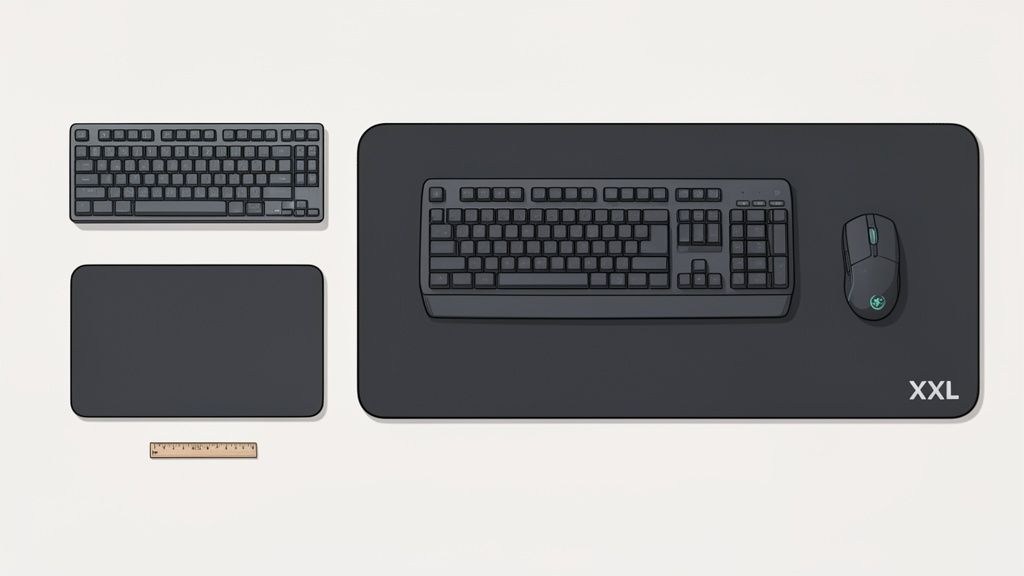
The first step is purely practical: grab a measuring tape and measure without hesitation the free space you have on your desk. Don’t trust your eyes, they can be deceiving. Write down the width and depth you have to work with and you’ll avoid the surprise of the mousepad clashing with the monitor or not leaving room for the keyboard.
Beyond what your desk measures, it’s your personal style that will really define the perfect size. We don’t all move the mouse the same way; things change a lot depending on whether you’re a wrist player or an arm player.
Wrist Players (Sizes S and M): If your movements are short, fast and almost all come from your wrist, you definitely play with high sensitivity (DPI). For you, a compact mousepad, whether small (S) or medium (M), is more than enough. They’re perfect for minimalist setups or to throw in your backpack and take to a LAN party with your buddies.
Arm Players (Sizes L and XL): On the other hand, if you’re one of those who play with low sensitivity in shooters like CS:GO or Apex Legends, your movements will be much wider, originating from your elbow and shoulder. Here you need a landing strip so you don’t get stuck halfway through a 180-degree turn. Large (L) or extra-large (XL) mousepads are your territory.
XXL mousepads, also known as desk mats, deserve a special mention. These beasts cover practically your entire desk, creating a uniform and stable surface for both your mouse and keyboard. Their main advantage is that they give you absolute freedom of movement, eliminating any physical limit.
A desk mat is not just functionality; it’s a statement of intent. It unifies the aesthetics of your entire battlestation, turning a simple desk into a thematic canvas. Imagine one with the map of Middle-earth or the logo of the Umbrella Corporation.
Besides, these giant mousepads give your keyboard a solid base, preventing it from sliding during intense sessions, and in the process protect your desk surface from scratches and accidental spills. They are, without a doubt, the perfect throne for your setup.
In the end, it’s about finding the perfect balance between the space you have and the space you need to move with total comfort. May you never get eliminated for going off the map.
Think of the combination of your mouse and mousepad as if you were choosing the right wand in the Harry Potter universe or a lightsaber for a Jedi: the connection has to be perfect. It’s no good having a state-of-the-art mouse if the surface isn’t up to par; without realizing it, you’ll be sabotaging all its potential.
This alliance is especially critical when we talk about your mouse’s sensor, that little all-seeing eye. Most modern mice use optical sensors, which work by capturing thousands of images per second of the surface to detect movement. These sensors love cloth mousepads, since their microtexture gives them thousands of reference points for flawless and error-free tracking.
Today’s optical sensors are incredibly versatile, but where they really shine is on well-controlled cloth surfaces. A good cloth mousepad guarantees that the sensor never gets lost, not even in the most brutal and fast movements you can imagine.
On the other hand, we have laser sensors, which although they are less common in current high-end gaming, can work on a wider variety of surfaces, even on the hardest and most reflective ones like glass. However, their extreme sensitivity sometimes plays a bad trick on them, coming to detect microscopic irregularities that cause annoying jittering.
Jittering is that erratic cursor tremor, as if it had seen a ghost from Phasmophobia. It happens when the sensor misinterprets the surface and turns a smooth movement into a shaky dance that can cost you that crucial match.
A bad combination between the sensor and the mousepad can cause all kinds of problems, from reading failures to acceleration that makes no sense. It’s like trying to team up Batman and the Joker: simply, it doesn’t work. What you’re looking for is a duo as infallible and coordinated as Batman and Robin.
The key to all this is consistency. A good mousepad gives your mouse sensor a uniform and predictable surface, allowing you to develop precise muscle memory. It doesn’t matter if you’re aiming in Apex Legends or retouching a photo in Lightroom, this reliability is what will give you the edge. If you want to see how different materials influence this relationship, check out our guide on mouse material and its ideal surface.

Over time, your mousepad becomes a map of your past battles. Dust, sweat, leftover midnight snacks… it all accumulates on the surface and ends up affecting the glide and precision of your mouse.
A dirty mousepad is the nerf you don’t see coming. But don’t worry, here you have the ultimate Kamehameha to obliterate the grime. Keeping it spotless is crucial so its performance doesn’t plummet over time. It doesn’t matter if you have an epic Marvel design or a minimalist one; a clean surface guarantees that your mouse sensor reads the information without interference, giving you that consistency you need to win.
Fabric mousepads are the most common, but they’re also genuine dirt magnets. To restore them to their former glory without messing up that cool Dragon Ball print, you just have to follow these steps:
Patience, young Padawan. Drying can take between 24 and 48 hours. If you try to speed up the process, you risk deforming the mousepad and leaving the surface unusable forever.
Rigid mousepads are much easier to maintain, let’s be honest. For them, all you need is a microfiber cloth slightly dampened with water. If it has any stubborn stains, you can add a tiny drop of glass cleaner. Wipe it across the entire surface, dry it well, and it’s ready for action in seconds!
With regular maintenance, your mousepad will last longer than the One Piece series, ensuring that your investment delivers the best performance for years to p>.
Your battlestation is more than hardware; it’s a reflection of your personality. Every element, no matter how small it seems, helps tell your story. The mousepad has stopped being a simple surface to become a canvas that defines your space.
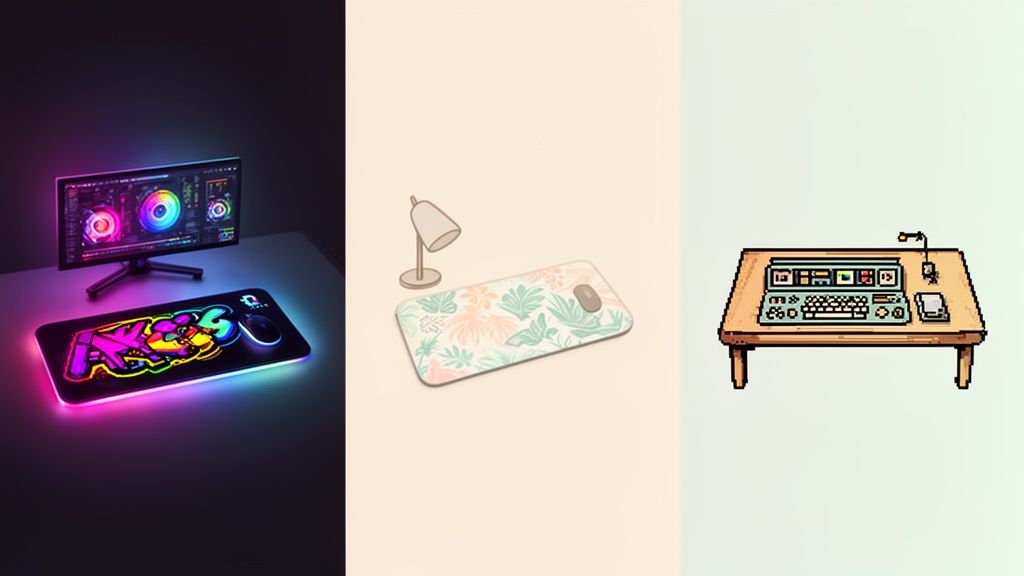
It’s not enough to group geeky objects together; the magic happens when each piece dialogues. A well-chosen mousepad can be the focal point that unifies your setup or the pop of color that breaks up your minimalist aesthetic.
For your desk to make an impact at first sight, coherence is key. Check out these examples:
RGB Synchronization
Pair a League of Legends mousepad in blue and gold tones with the lighting on your keyboard and tower. The result: an aura that transports you directly to the Summoner’s Rift.
Franchise theming
Place an XXL mousepad with the Millennium Falcon next to your Funko Pop figures and a framed poster. Instantly, your desk becomes a galaxy far, far away.
Styles and environments
If you’re looking for calm, choose a zen design from Studio Ghibli, with Totoro or a landscape from Spirited Away. You’ll create a perfect environment to concentrate and relax.
Your desk is your canvas. The mousepad is the first brushstroke that sets the tone for the entire work.
Geek culture is unstoppable. Sales of merchandise related to video games and anime have grown over 50% in Spain since 2020. A good chunk of that growth corresponds to mousepads, with over 60% of fans actively seeking personalized designs of their favorite characters or fantasy worlds.
This evolution demonstrates that a mousepad should not only perform at one hundred percent, but also tell who you are. Whether you go for a vibrant print or a subtle pattern, the right choice elevates your setup from a simple desk to an authentic reflection of your inner universe.
We’ve reached the final stretch, a kind of Pokédex where we resolve the most common doubts that arise when talking about mousepads. Here you’ll find direct answers and no beating around the bush, as if you were consulting the official guide to a game, so you can make the best decision without getting lost along the way.
The short answer is a resounding yes. Although a modern sensor can “get by” on wood or even glass, a dedicated mousepad improves tracking precision in a brutal way. It’s the difference between having decent control and surgeon-level control, something key to not missing that headshot in the last second.
Besides, a good mousepad protects both the surfers of your mouse (those sliding feet that suffer so much) and the surface of your desk from daily wear. For gaming or designing, it’s not an option, it’s an essential piece of your setup.
The clearest alarm goes off when the sliding of your mouse no longer feels uniform, not even right after cleaning it. If you notice that there are areas where it “scratches” or the friction has suddenly changed, it’s time to say goodbye, like a teammate who retires with honors.
With fabric mousepads, this usually happens every one to three years, depending on how hard you use it. If you see the edges starting to fray or the surface is visibly worn, like the armor of a veteran warrior, it’s time to find a new ally for your battles.
Think of your mousepad like the tires on a racing car. You can have the best engine in the world, but if the rubber is worn out, you’ll lose grip and control right at the most important curves.
At a functional level, not at all. RGB lights are pure aesthetics, like a legendary skin in your favorite game. They won’t give you more FPS or make you aim better, but watch out!, that doesn’t mean they’re not important.
For a gaming setup where visual coherence is key, an RGB mousepad can be the final piece that synchronizes your entire lighting ecosystem. It can create an immersive and spectacular atmosphere, making your battlestation look like it came straight out of a Blade Runner scene. The decision depends on whether you prioritize pure performance or the look of your sanctuary.
At Geek T-Shirt Store we understand that every detail of your setup counts. That’s why, in addition to equipping you with the best designs, we help your space speak about you. Explore our collection and find the t-shirt that completes your universe.
Discover your next geek t-shirt here
Hundreds of original designs waiting for you in the store.
Join the club and we’ll email your welcome coupon right away. Original anime, gaming and comic designs.